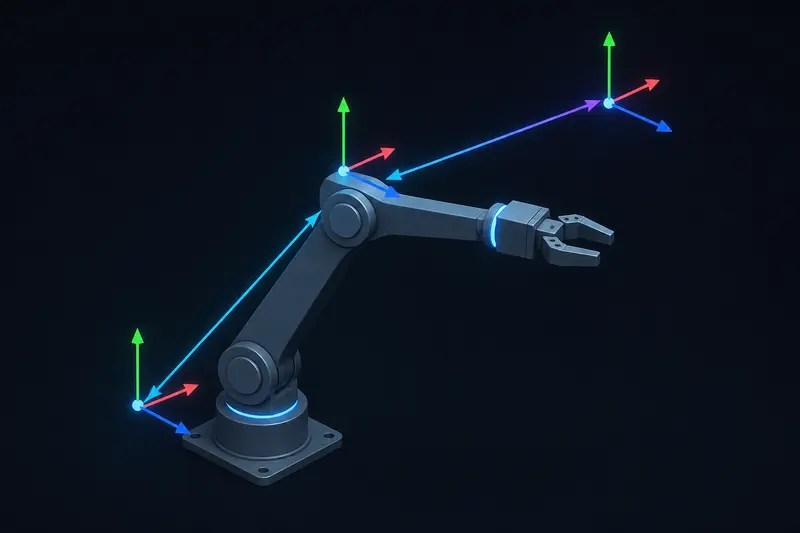
ROS2 tf2 transforms explained the way most tutorials do it stops at the API: call lookupTransform, get a pose back, move on. That's fine until the call throws tf2::ExtrapolationException or tf2::LookupException in production, and the usual advice online is "check your frame names" or "add a static transform publisher." That fixes maybe half the real cases. The other half comes from how tf2 actually composes transforms over time, and that part is rarely shown with real numbers.
What tf2 actually stores
tf2 is not a lookup table of fixed offsets. It is a buffer of timestamped transforms, one per publisher, each describing how to go from a parent frame to a child frame at a specific instant. A robot arm typically publishes a chain like:
base_linktoshoulder_link(fixed, from the URDF joint origin plus the current joint angle)shoulder_linktoelbow_link(same, one link down)elbow_linktoend_effector
When you ask for base_link to end_effector, tf2 walks the tree, multiplies the transforms along the path, and interpolates each one to the timestamp you asked for. That multiplication is the part worth doing by hand once.
A worked homogeneous transform example
Represent each frame-to-frame relationship as a 4x4 homogeneous transform matrix:
T = [ R p ; 0 0 0 1 ]
where R is a 3x3 rotation matrix and p is a 3x1 translation vector. Say the shoulder joint has rotated 90 degrees about its local Z axis and the link from shoulder to elbow is 0.30 m long along its local X axis after that rotation. The transform from shoulder_link to elbow_link is:
R = [ 0 -1 0 ; 1 0 0 ; 0 0 1 ], p = [0.30, 0, 0]
Now say base_link to shoulder_link is a fixed offset with no rotation and a translation of [0, 0, 0.15] (a 0.15 m pedestal). Composing the two transforms to get base_link to elbow_link is a single matrix multiplication:
T_base_elbow = T_base_shoulder * T_shoulder_elbow
Multiplying out just the translation part (rotate the child's translation by the parent's rotation, then add the parent's translation):
p_result = R_base_shoulder * p_shoulder_elbow + p_base_shoulder. With R_base_shoulder as the identity matrix here, p_result = [0.30, 0, 0] + [0, 0, 0.15] = [0.30, 0, 0.15]
and the rotation part is just R_base_shoulder * R_shoulder_elbow, which here is the same 90-degree rotation since the base-to-shoulder rotation is identity. This is exactly what tf2 does internally for every lookupTransform call across a chain, except it does it per-timestamp and interpolates rotations with spherical linear interpolation (slerp) rather than a linear blend, because rotation matrices don't average linearly.
Why lookupTransform actually throws
Once you see tf2 as a time-indexed buffer being interpolated, the common exceptions stop being mysterious.
LookupException: frame does not exist
This means tf2 has never received a single message on that frame name. Check with:
ros2 run tf2_ros tf2_echo base_link end_effector
and confirm with ros2 topic echo /tf or /tf_static that a publisher is actually running and using the exact frame_id string you expect, including case. A joint state publisher that died silently produces this error even though the URDF defines the frame correctly.
ConnectivityException: frames not connected
The two frames exist in tf2's buffer but belong to two separate, unconnected trees. This happens when a sensor node publishes its own root frame (for example a lidar node publishing lidar_frame with no parent) instead of being attached under base_link through a static or dynamic transform. Run ros2 run tf2_tools view_frames to get a PDF of the actual tree and look for a second disconnected root.
ExtrapolationException: this is the timing one
This is the exception that "check your frame names" does not fix. tf2's buffer only holds a limited history, 10 seconds by default. If you ask for a transform at a timestamp older than the oldest entry still in the buffer, or for a timestamp newer than the most recent one received, tf2 refuses to extrapolate and throws instead of guessing.
The most common trigger is a slow-arriving message. Say a camera frame is timestamped at capture time but takes 150 ms to reach your node after image processing. If you call lookupTransform using that message's original timestamp, and your joint state publisher is running at 50 Hz (a new transform every 20 ms), tf2 needs a transform from up to 150 ms in the past. If nothing in the chain was published that far back relative to now, or if a downstream node's buffer duration is shorter than 150 ms, the lookup throws.
Fix it one of three ways, in order of preference:
- Reduce processing latency so the timestamp lag stays under your buffer window.
- Call
canTransform()with an explicit timeout and let it wait for the transform to arrive rather than failing immediately on the first try. - If a small amount of staleness is acceptable, look up the transform at
rclcpp::Time(0)(the latest available transform) instead of the exact message timestamp, understanding that you are trading timing accuracy for availability.
A related variant is asking for a timestamp in the future, usually because a node's clock is not synced to /clock when running in simulation with use_sim_time set inconsistently across nodes. Check that every node in the chain has the same time source before chasing anything else.
Static vs dynamic transforms
Publish a transform as static, using tf2_ros::StaticTransformBroadcaster or a static_transform_publisher node, only if it truly never changes relative to its parent, for example a camera bolted to a link, or the pedestal offset in the example above. Static transforms are published once (latched) and never expire from the buffer, so they cannot cause an extrapolation exception. Anything driven by an encoder or joint state, like the shoulder-to-elbow transform above, must be dynamic, republished on every joint update, because its value at time t only makes sense at time t.
A frequent mistake is publishing a joint transform as static during early development to get something working quickly, then leaving it static after the joint becomes actuated. The tf tree looks fine and view_frames shows a connected chain, but every downstream consumer silently uses the joint's startup angle forever.
Practical checklist
- Run
ros2 run tf2_tools view_framesfirst, always, before reading any exception message. Confirm the chain you expect actually exists and has one root. - For
LookupException, check the publisher is alive and the frame_id string matches exactly, including leading slashes on older ROS1-ported code. - For
ConnectivityException, look for a second disconnected root in the same PDF. - For
ExtrapolationException, compare your requested timestamp against your buffer duration and the actual publish rate of the slowest link in the chain, and checkuse_sim_timeconsistency across nodes. - Never leave a joint transform as static past early prototyping, even if it happens to be sitting at zero.
tf2's design deliberately refuses to guess when it does not have enough data, which is safer than silently returning a stale or extrapolated pose to a control loop. Once you read the exception as a statement about buffer timing rather than a frame-naming typo, most of these errors take minutes to diagnose instead of hours. This same timing discipline matters just as much elsewhere in a ROS2 stack, for example in ROS2 QoS settings, where a mismatched policy causes a subscriber to silently receive zero messages instead of throwing a clear error.
Building or studying robotics?
Arcbotix publishes practical guides on robotics engineering, control systems and real-world builds. Explore more articles on the blog.